Introduction:
All computers in the car use digital electronics: the numbers 1 and 0. If computer A wants to send certain information to computer B via CAN bus, a message consisting entirely of 1s and 0s is created (binary), then converted into a decimal or hexadecimal message, which is recognized and processed by computer B. The processor of the computer always works internally with ones and zeros. The decimal and hexadecimal codes from the sensors and other computers must therefore always be converted. The 1 means ‘on’ and a 0 ‘off’.
The binary system is used internally by control units. Binary codes can also be used for small data transmissions, e.g. switch on (1) or off (0). For larger data transfers from, for example, a temperature sensor, many ones and zeros have to be transmitted. With, for example, a hexadecimal system, the temperature can be transmitted much more accurately via the data bus, because many more different temperatures can be transmitted between 00 and FF than the combinations of ones and zeros in the binary system. The codes can also be converted manually. How that works is explained further down this page.
Binary:
Binary system: 01
Possibilities: 0 or 1
Practical example: A window switch sends a decimal code of 252 via the data bus to the control unit. The code is converted by the control unit into a binary code of 11111100. The control unit recognizes that this is the code to open the right front window. The control unit supplies voltage to the window motor until the switch sends the code 00000000, or until the window has reached its end position.
| L.f. window open: | 11111110 | Close: | 01111111 |
| R.f. window open: | 11111100 | Close: | 00111111 |
| L.r. window open: | 11111000 | Close: | 00011111 |
| R.r. window open: | 11110000 | Close: | 00001111 |
| Switches rest position: | 00000000 | Fault: | 11111111 |
Decimal:
Base-10 system: 0123456789
Range: Between 0 and 255
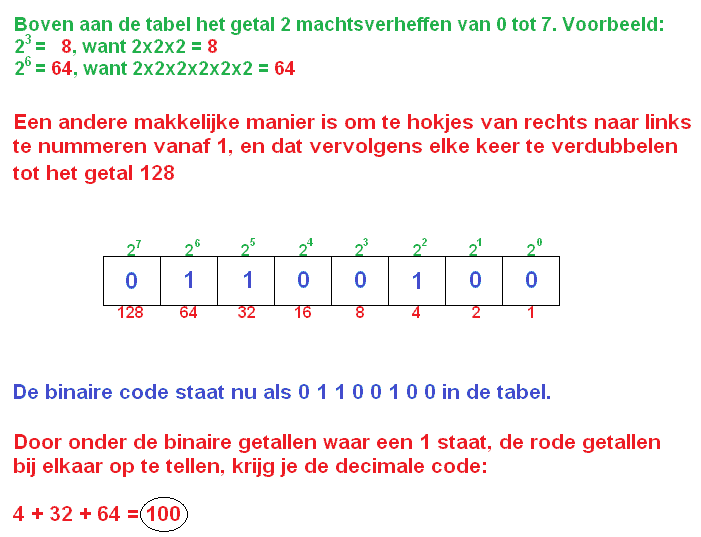
A decimal number can be seen as a compact binary number. A binary value of: 01100100 is decimal: 100.
Hexadecimal:
Base-16 system: 0123456789ABCDEF
Range: Between 00 and FF
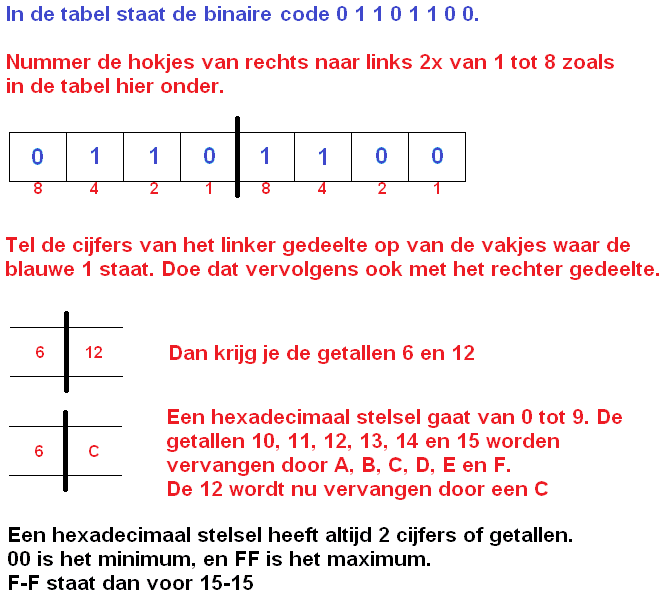
The hexadecimal system is more extensive than the decimal system. Hexa goes from 0 to 15, while deci goes from 0 to 9.
The digits higher than 9 are indicated with letters:
10 = A
11 = B
12 = C
13 = D
14 = E
15 = F
This therefore provides more possibilities than the decimal system and will be ideal for control units with a lot of data transfer.
Converting binary to decimal:
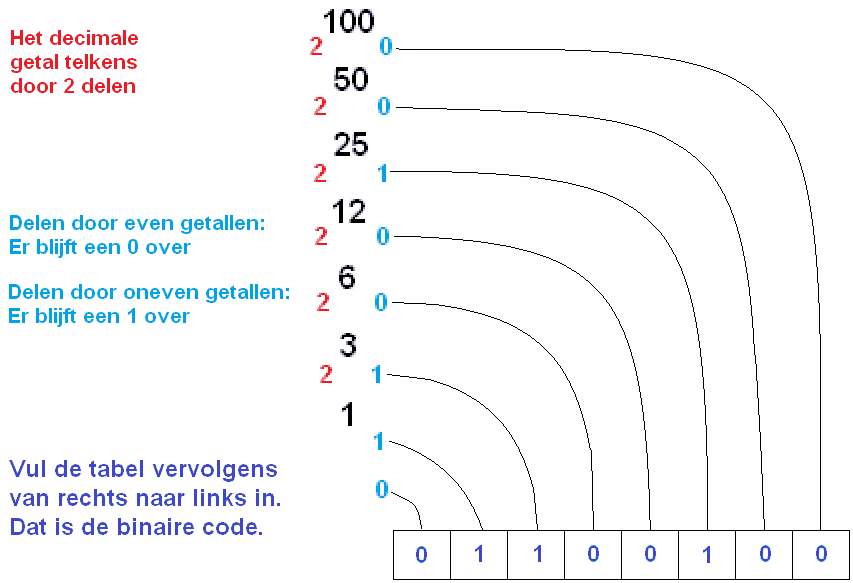
Converting decimal to binary:
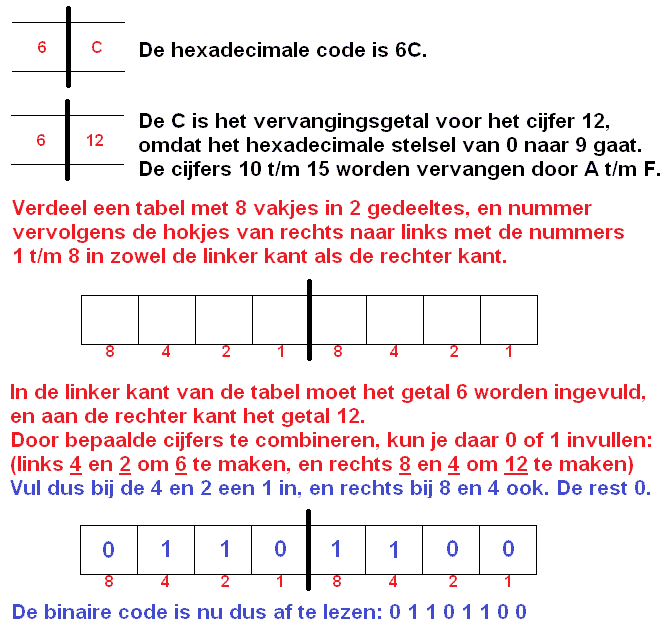
Converting binary to hexadecimal:
Converting hexadecimal to binary:
Related page: