Introduction:
Parking assist includes systems that help a driver to park and to pull out of a parking space. The best-known parking assist system is “park distance control”, abbreviated as PDC. This system informs the driver of the vehicle about the distance to the car behind and, in more advanced systems, also to the front of the vehicle. On this page the modern technologies are described that are either an extension of park distance control or a completely standalone assist system.
Park distance control:
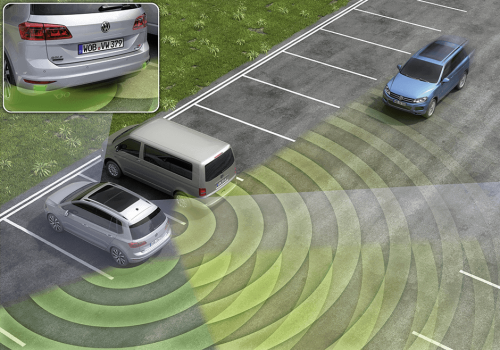
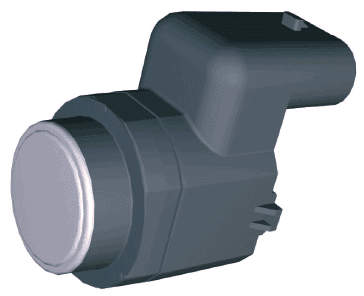
Park Distance Control (PDC) is a distance warning system that measures signals when parking in and out and informs about the distance to the obstacle. Ultrasonic sensors are mounted in the rear bumper and often also in the front bumper (see image). These emit sound waves at a very high frequency that are not perceptible to the human ear. These ultrasonic frequencies are reflected by objects nearby and are received again by the sensor. The sensor measures the time between sending and receiving these signals. The closer the object is, the faster the signal is reflected back. The sensor picks this up and passes it on to the PDC control unit (computer).
This computer can relay it as audible signals and with both visual and audible signals to the driver. A beeping sound can be heard, which beeps faster and faster as the object gets closer. At a distance of approximately 30 cm it emits a constant tone, telling you as the driver that you must stop.
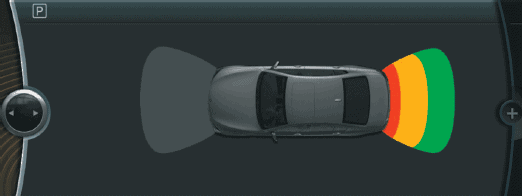
Modern on-board computers are often equipped with an option where the distance to the object is shown on a display. The PDC sensors are the same; the control unit calculates the data from the sensors and processes this into information that the display can show.
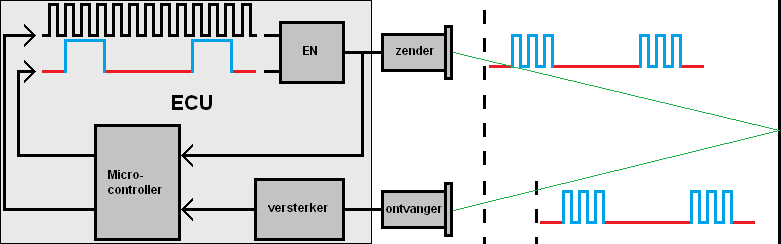
In the image below, the PDC control unit (ECU) is shown. In this grey square are the microcontroller, amplifier and an AND gate. The microcontroller sends a square-wave voltage with a frequency of approximately 40 kHz (black). A square-wave voltage with a low frequency is also periodically transmitted (red / blue). The AND gate receives the two square-wave voltages. When both voltages are high, the output voltage (to the right of the AND gate) is high. When one of the two voltages is low, the output is also low. The output voltage is sent back to the microcontroller and to the transmitter in the PDC sensor. The transmitter emits the ultrasonic signal at a speed of approximately 300 m/s. When there is an object nearby, the ultrasonic sound is reflected and is registered by the receiver. This is called “triangulation”. The receiver sends the generated square-wave signal to the ECU. With the help of an amplifier the square-wave signal is amplified and then processed by the microcontroller.
The time between receiving the output signal from the AND gate and the amplifier is a measure of the distance to the object. The smaller the distance between the PDC sensor and the object, the shorter the time. The microcontroller controls the buzzer, or communicates via the CAN bus with other control units.
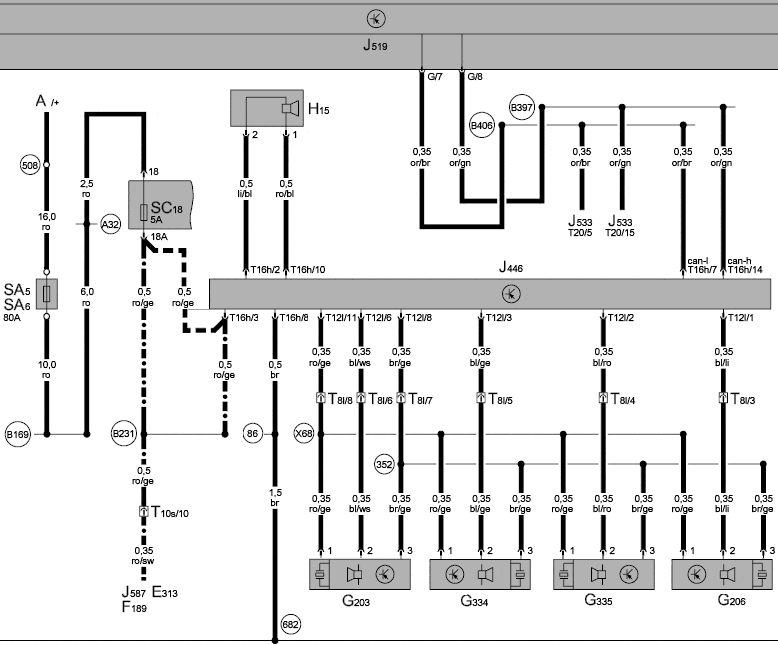
The wiring diagram below (VAG) shows the communication between the control units, inputs from switches and outputs to, among others, the buzzer.
The PDC control unit (J446) receives the driving speed and the reverse signal via the CAN bus. The PDC control unit sends a modulated square-wave voltage via connection T12/11 to the splice connection (X86 in the rear bumper) which is connected to all PDC sensors (G203, G334, G335 and G206). Each PDC sensor has its own signal wire (via pin 2) to the ECU. Furthermore, the ground of each sensor is connected to a ground splice (352).
When one or more sensors detect an object, the control unit activates the buzzer (H15). Depending on the distance to the object, the buzzer emits a faster or slower intermittent audible signal.

Thanks to communication with the diagnostic interface (J533), it is possible to perform the following diagnostic functions:
- read out the fault memory
- change codings of the control unit (e.g. after extending the system with PDC sensors at the front or after installing a tow bar)
- adjust the buzzer volume
- read measuring value blocks, including the distance from all sensors to the object, the calculated distance and the stabilisation time of the transmitter and receiver.
Reversing camera:
In addition to park distance control, the parking assist can also be equipped with a reversing camera. When the driver puts the vehicle into reverse gear or presses a button in the interior, the camera at the rear of the vehicle is activated. Usually, the display of the radio or the on-board computer shows the image.
In the image below, a display of a BMW is shown with the view behind the vehicle. To the right of the camera image is a vehicle with a three-part grid at the front and rear; this shows the distance to an object that the PDC sensors register.
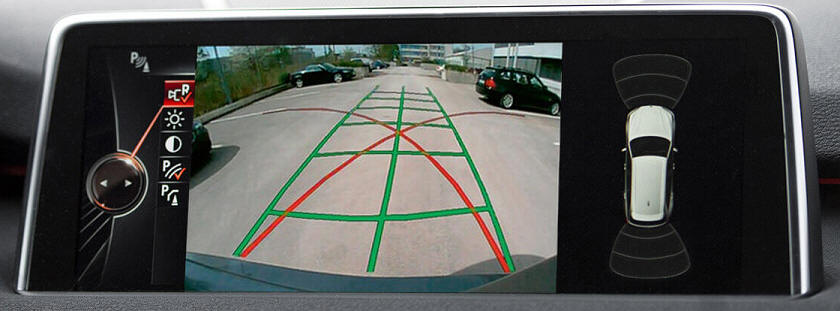
In the image from the reversing camera, red and green lines can be seen. The red lines show the possible direction in which the vehicle can be steered; with the steering wheel at full lock, the wheels on the outside of the bend will follow the red line. The green grid follows the direction in which the steering wheel is turned; at this moment the front wheels are straight. When the driver turns the steering wheel, the green lines indicate the actual driving lines. The steering angle sensor registers the position of the steering wheel.
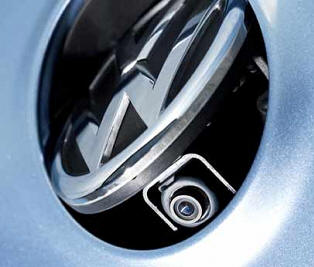
The reversing camera is sometimes in view and is often located near the license plate and/or the handle for opening the tailgate. Sometimes manufacturers choose to mount the camera out of sight. The image below shows the reversing camera of a VW Golf, in which an electric motor tilts the VW emblem to move the camera outwards. The emblem automatically folds back again when driving forward. Not only is the camera placed out of sight, but the lens also becomes dirty less quickly.
Side view:
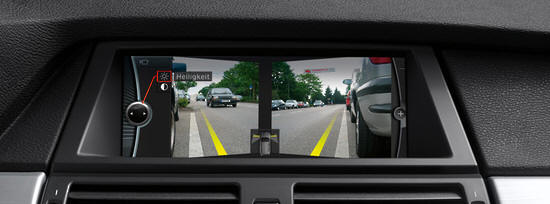
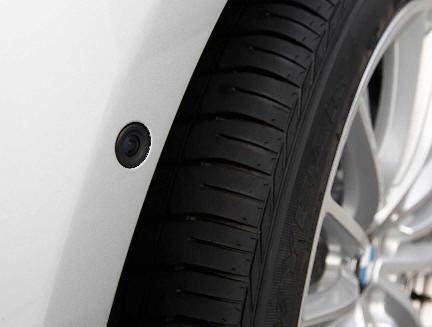
When you are parked in reverse between two vehicles or large objects, you have to drive forward a bit to look to the left and right. With a side view camera (also called corner view) this is much easier; cameras on the left and right in the front bumper send the image to the display in the dashboard. The image shows the view from the corner cameras. Cameras unfortunately cannot be mounted invisibly. Cars fitted with a side view camera have a (usually) black lens in the bumper. The image below shows the front bumper of a BMW with the left camera.
Surround view:
Among the most luxurious parking assist systems is undoubtedly the “surround view”, also called top view, 3D or bird-view. Each brand gives its own name and characteristic to the system. Here we will use the term surround view.
With surround view, the top of the car is shown on the display. It looks as if there is a camera on the roof of the car looking at the surroundings around it. The car is a simulation and the surroundings are composed from images recorded by several (usually four) cameras.
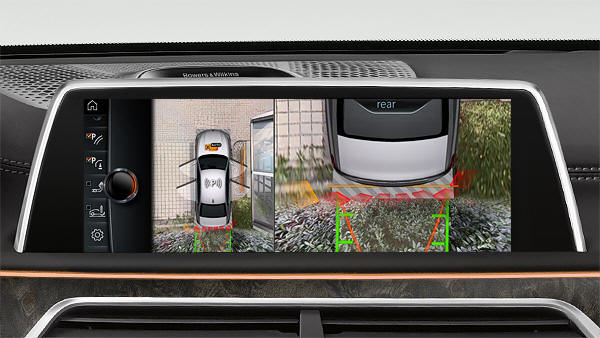
The next three images (from BMW) show the view that the driver sees. While parking, the boundaries of the parking space and objects such as posts, etc. are clearly visible. When reversing, it is possible to zoom in on the rear; here mainly plants can be seen. The conventional PDC sensors register the distance to the plants. The computer marks this distance in red.
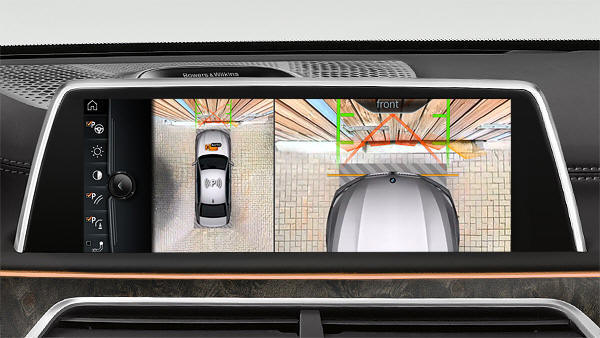
During forward parking, the system can also show the surroundings and the front of the vehicle. Again, PDC sensors help determine the distance to the fence.
Parallel parking along a curb can, if the driver does not pay close attention, lead to damage to the tyres and rims. Here too, surround view offers a solution; thanks to the clear overview of the street scene, it is possible to park perfectly straight and close to the curb. The latest developments from BMW make it possible to invert the camera image and simulate the vehicle.
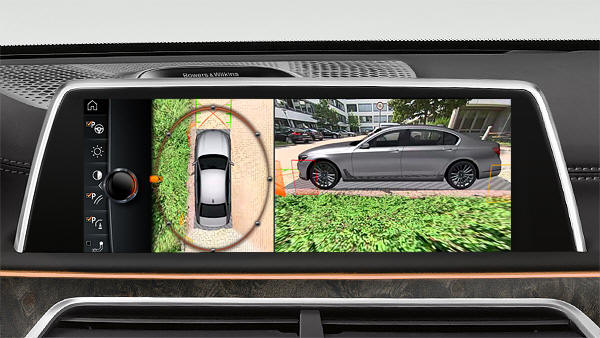
The following three images show the locations where the cameras are usually mounted.
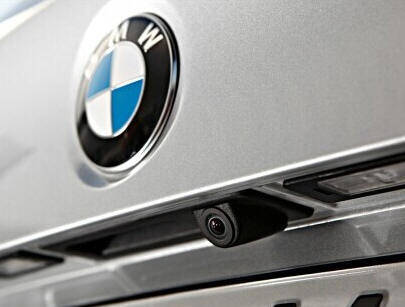
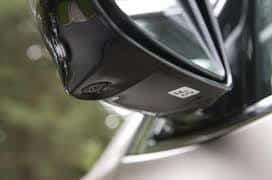
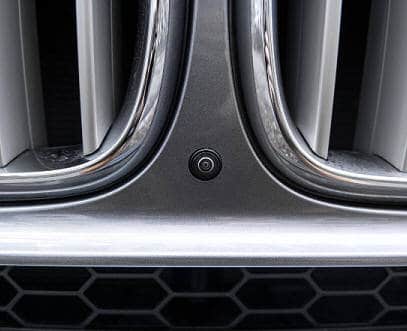
Parking exit assist:
As an extension of the parking assist, the so-called “parking exit assist” can help the driver when reversing out of a parking space with limited visibility. This may be in situations where the vehicle is parked next to a wall or between vehicles.
The sensors at the rear of the car detect traffic crossing behind the vehicle that may pose a risk of a collision. This includes all moving objects that are approaching the vehicle at a certain speed. When the parking exit assist system detects an approaching vehicle, a warning appears on the infotainment system display. Usually an acoustic signal is added. If the driver ignores these signals and still reverses, the system intervenes physically by applying the brakes and slowing the vehicle down.